Common Setup
Mail, storage, queue and cron, AI keys, payment gateways, push, social OAuth, headless Chrome and CDN.
Item: MediaDesk — Multilingual AI-Powered Newsroom ERP
Where Settings Live
MediaDesk keeps third-party credentials in the admin panel, not in files: Settings → Integrations (/admin/settings/integrations). Values are stored encrypted in the settings table, override .env, and most groups have a Test connection button. .env keeps what is needed to boot: APP_KEY, database, cache/queue drivers. If you already filled .env, copy the values in once:
php artisan integrations:import-env
Third-party services and ongoing costs. MediaDesk works with external services that you sign up for and pay for yourself: hosting and domain, e-mail delivery (SMTP, Mailgun, Postmark, Amazon SES, Brevo), payment gateways (Stripe, PayPal, SSLCOMMERZ, bKash and the others; transaction and provider fees), Firebase Cloud Messaging for app push, AI providers (Anthropic, Google Gemini, OpenAI), object storage and CDN (Amazon S3, Cloudflare R2, Backblaze B2, Bunny), video hosting or embeds (YouTube and similar), and the Apple Developer Program and Google Play Console for the mobile app. You are responsible for your own accounts with these providers and for any current or future fees they charge; none of them is included in the item price. Every one of them is optional except hosting.
Who does what on this page: everything entered under Settings → Integrations (mail, AI, payments, push, storage, social) is an admin panel task: paste the value, press Save, then Test connection. Cron, queue worker, web server, Redis, headless Chrome and CDN rules are server administrator tasks. See Start Here: Who Does What.
Do not rotate APP_KEY after saving secrets: they are encrypted with it and would read as empty. If you use config:cache the Integrations overlay is still applied at runtime.
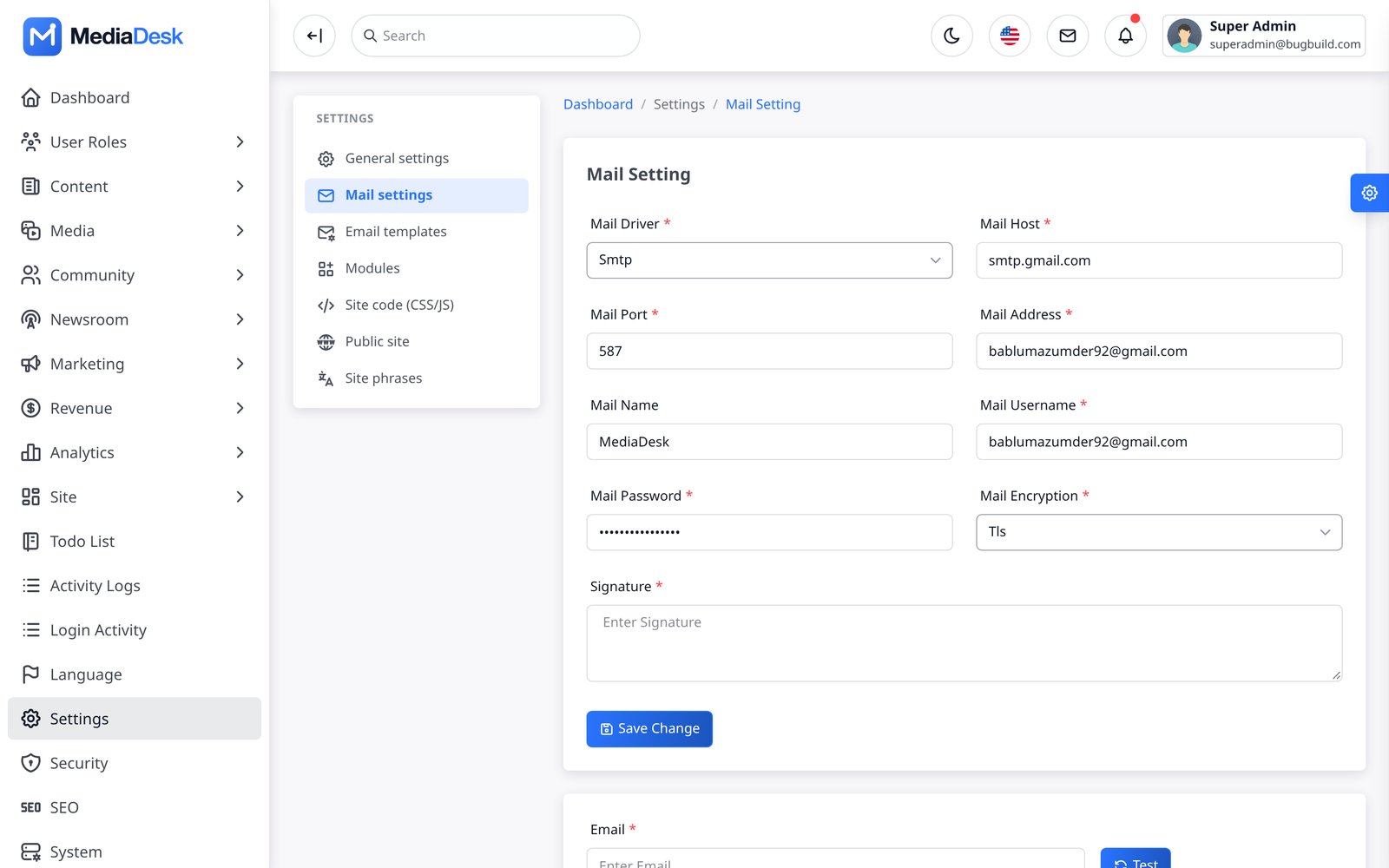
Used for newsletter confirmation, reader registration and password reset, contact form, newsletter digests, dunning and invoice mails. Open Integrations → Mail / SMTP: mailer (SMTP, Brevo API, Amazon SES, Mailgun, Postmark, sendmail, log), host, port, encryption, username, password, from address and name, and the contact-form recipient.
| Provider | Settings |
|---|---|
| SMTP (any host) | Mailer SMTP, host, port (587 with TLS / 465 with SSL), username, password |
| Brevo (API) | Integrations → Brevo: API key; then choose mailer Brevo (API) in Mail / SMTP |
| Mailgun / Postmark / SES | Integrations → Mailgun / Postmark / SES, then choose the mailer |
| Local testing | MAIL_MAILER=log (the default in .env.example): nothing is delivered, mail text is written to storage/logs/laravel.log |
# .env equivalents
MAIL_MAILER=smtp
MAIL_HOST=smtp.example.com
MAIL_PORT=587
MAIL_USERNAME=...
MAIL_PASSWORD=...
MAIL_ENCRYPTION=tls
MAIL_FROM_ADDRESS="[email protected]"
MAIL_FROM_NAME="${APP_NAME}"
[email protected]
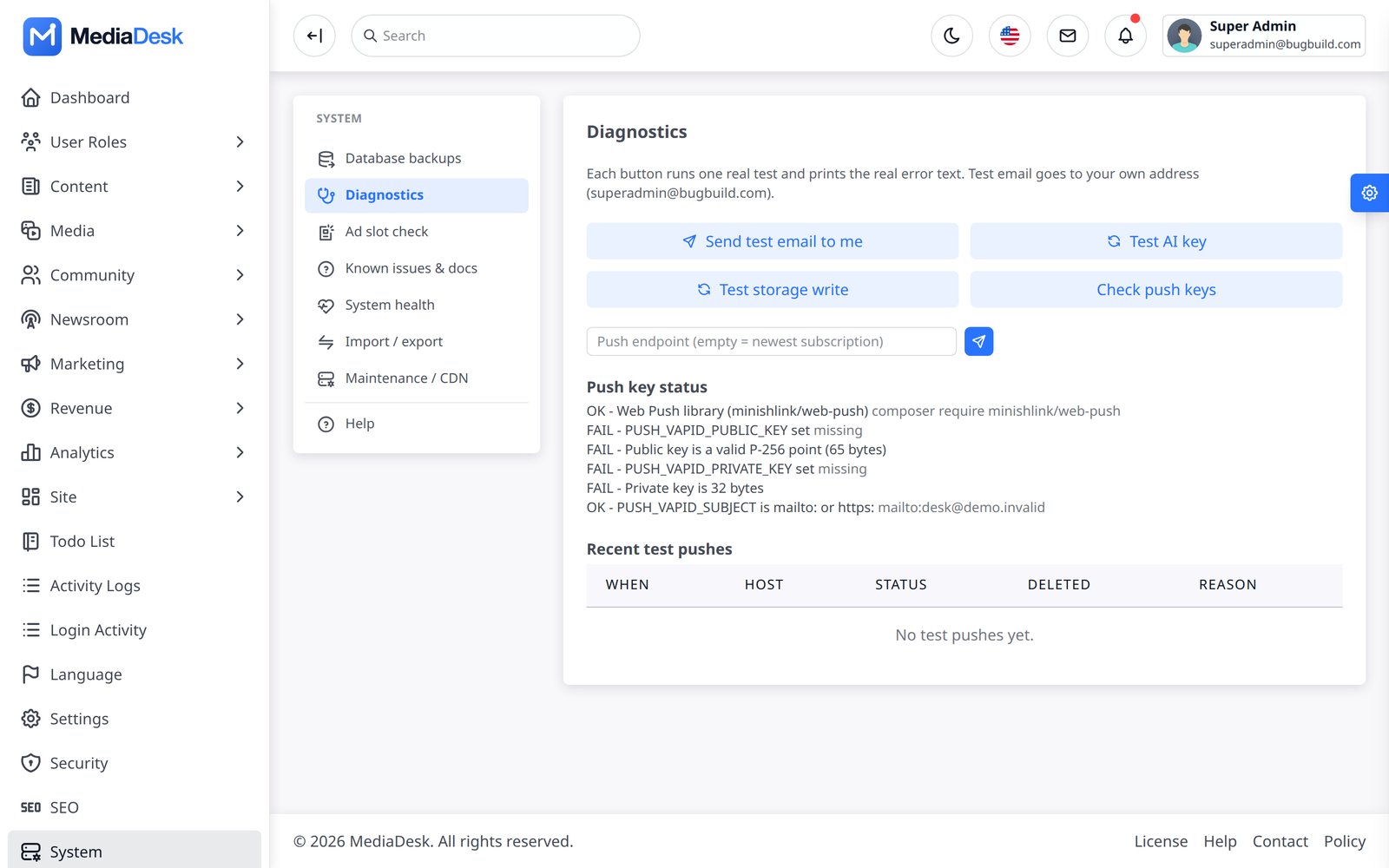
Test: Tools → Diagnostics → Send test email (sends to your own address). For bulk sending set SENDER_MAIL_RATE (mails per second, default 10) below your provider’s limit and run a queue worker. Digest mails use the WebP image conversions, which Outlook desktop does not render.
Storage & Media
Uploads go through the media library on the disk named by MEDIA_DISK / Integrations → Media storage disk: public (default: storage/app/public served through the public/storage link), s3, r2 or b2.
Google Drive database backups (v1.2.0): open Settings → Integrations → Storage → Google Drive backups. Save enable/retention/minimum-copy settings, OAuth Client ID, Client Secret, Refresh Token and folder name/ID, then press Test connection. Client Secret and Refresh Token are encrypted in the database. These backup settings never use .env. Local SQL backups remain enabled even when Drive is off or unavailable; manage them under System → Operations.
Local disk
Run
php artisan storage:link. Checkreadlink public/storageequals$(pwd)/storage/app/public(the link stores an absolute path; recreate it after moving the project). Back upstorage/app/public.S3 / R2 / B2
Integrations → Amazon S3 | Cloudflare R2 | Backblaze B2: key, secret, bucket, region/endpoint and the public/CDN base URL. Use Test connection (writes, reads and deletes a probe file). Then pick the disk in Media storage disk. The bucket (or the CDN origin) must be publicly readable. The S3 flysystem package is already in
composer.json.Move existing files
php artisan media:migrate-disk public s3 --dry-run, then without--dry-run; add--delete-sourceto remove local copies after a verified copy. Then set the new disk as default.Images and video
Images use GD by default (
IMAGE_DRIVER=gd, needs WebP support) orimagick.ffmpeg/ffprobeare optional (FFMPEG_PATH,FFPROBE_PATH) and only for video/audio tooling.
# .env equivalents
MEDIA_DISK=s3
AWS_ACCESS_KEY_ID=...
AWS_SECRET_ACCESS_KEY=...
AWS_DEFAULT_REGION=us-east-1
AWS_BUCKET=my-bucket
AWS_URL=https://cdn.example.com
AWS_ENDPOINT=                 # R2 / MinIO / Spaces
AWS_USE_PATH_STYLE_ENDPOINT=false
Raise upload_max_filesize / post_max_size in PHP and client_max_body_size in nginx (the sample uses 64m) if you upload video or PDFs.
Queue, Cron & Scheduler
Two processes keep MediaDesk alive. Without them the website still works, but campaigns, push, social posts, renewals, e-paper builds, counters and the ledger do nothing.
1. Scheduler (cron)
* * * * * cd /var/www/mediadesk && php artisan schedule:run >> /dev/null 2>&1
For development use php artisan schedule:work. Inspect with php artisan schedule:list. The registered entries are:
Demo safety: the demo switch is APP_DEMO (the only name; see the .env reference). Never set APP_DEMO=true on a production site: the nightly reset deletes content.
| Command | Schedule |
|---|---|
stats:flush, ads:flush, automation:tick, social:publish-due, marketing:campaigns-run, frontend:push-breaking, platform:heartbeat, platform:webhooks-retry | every minute |
desk:fetch-sources | every 5 minutes |
authors:notify-followers | every 10 minutes |
membership:renew, health:check --record | hourly |
finance:post | hourly at :15 |
frontend:epaper-build | daily 05:30 (site time zone) |
frontend:newsletter-send daily | daily 07:00 (site time zone) |
ads:expiry-alert | daily 08:00 (site time zone) |
frontend:newsletter-send weekly | Fridays 08:00 (site time zone) |
authors:close-month | 1st of the month, 02:00 |
demo:reset | 03:00, only when APP_DEMO=true and APP_ENV is not production |
2. Queue worker
QUEUE_CONNECTION defaults to sync (jobs run inside the request). Production: redis (needs the phpredis extension; predis is not included) or database.
# database driver: the project has no jobs migration, create it first
php artisan queue:table
php artisan queue:failed-table
php artisan migrate

# run a worker (development)
php artisan queue:work --queue=default --sleep=3
; /etc/supervisor/conf.d/mediadesk-worker.conf
[program:mediadesk-worker]
command=php /var/www/mediadesk/artisan queue:work redis --sleep=3 --tries=1 --max-time=3600
user=www-data
numprocs=2
autostart=true
autorestart=true
stopasgroup=true
stopwaitsecs=3600
redirect_stderr=true
stdout_logfile=/var/log/mediadesk-worker.log
Campaign jobs are idempotent per recipient, so --tries=1 is intended. Optionally set SENDER_QUEUE=marketing and run queue:work --queue=marketing,default. After each deploy run php artisan queue:restart. Check System → System health (queue driver, failed jobs, scheduler heartbeat). php artisan mediadesk:doctor prints fix hints.
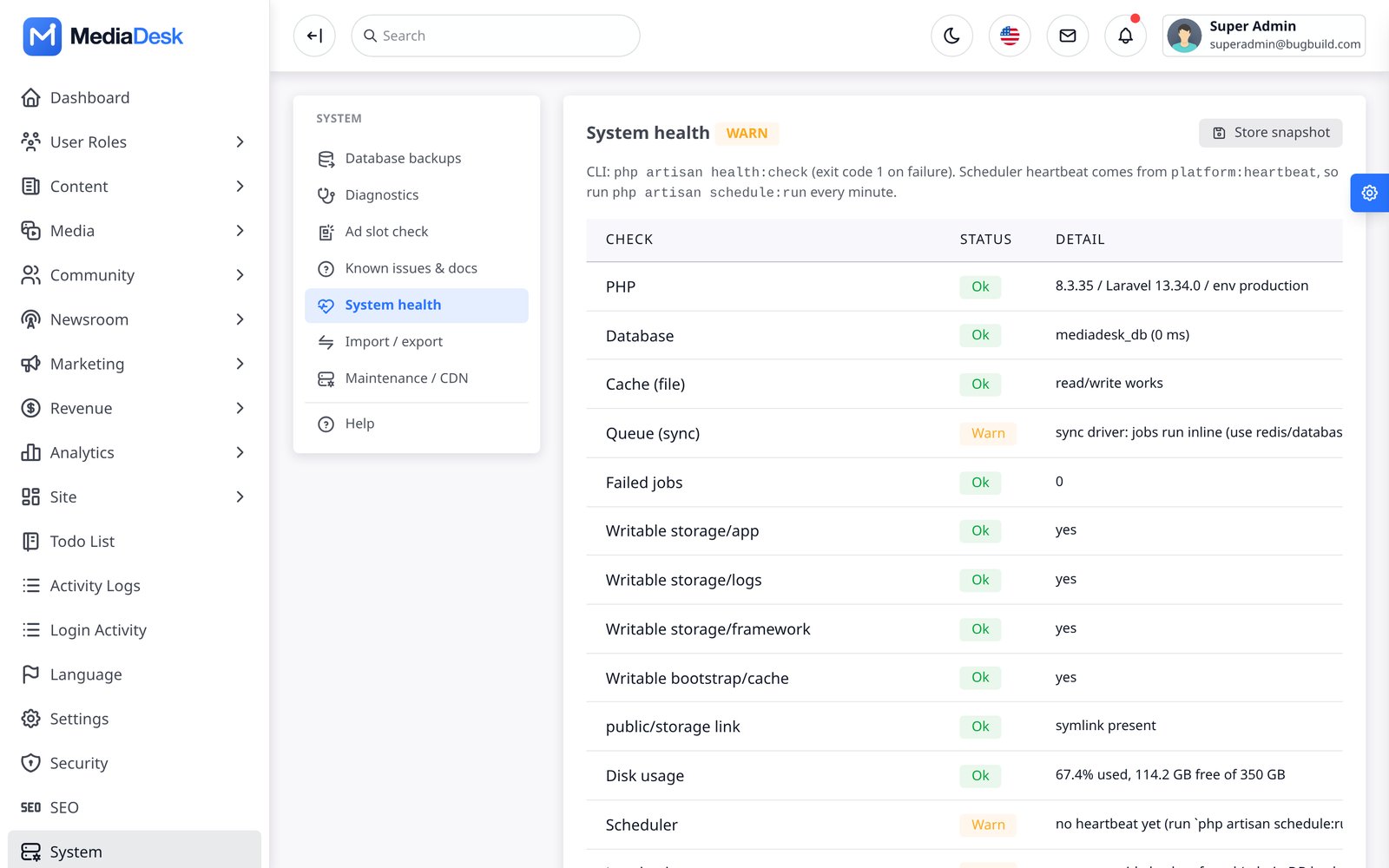
3. Confirm both are working (admin panel)
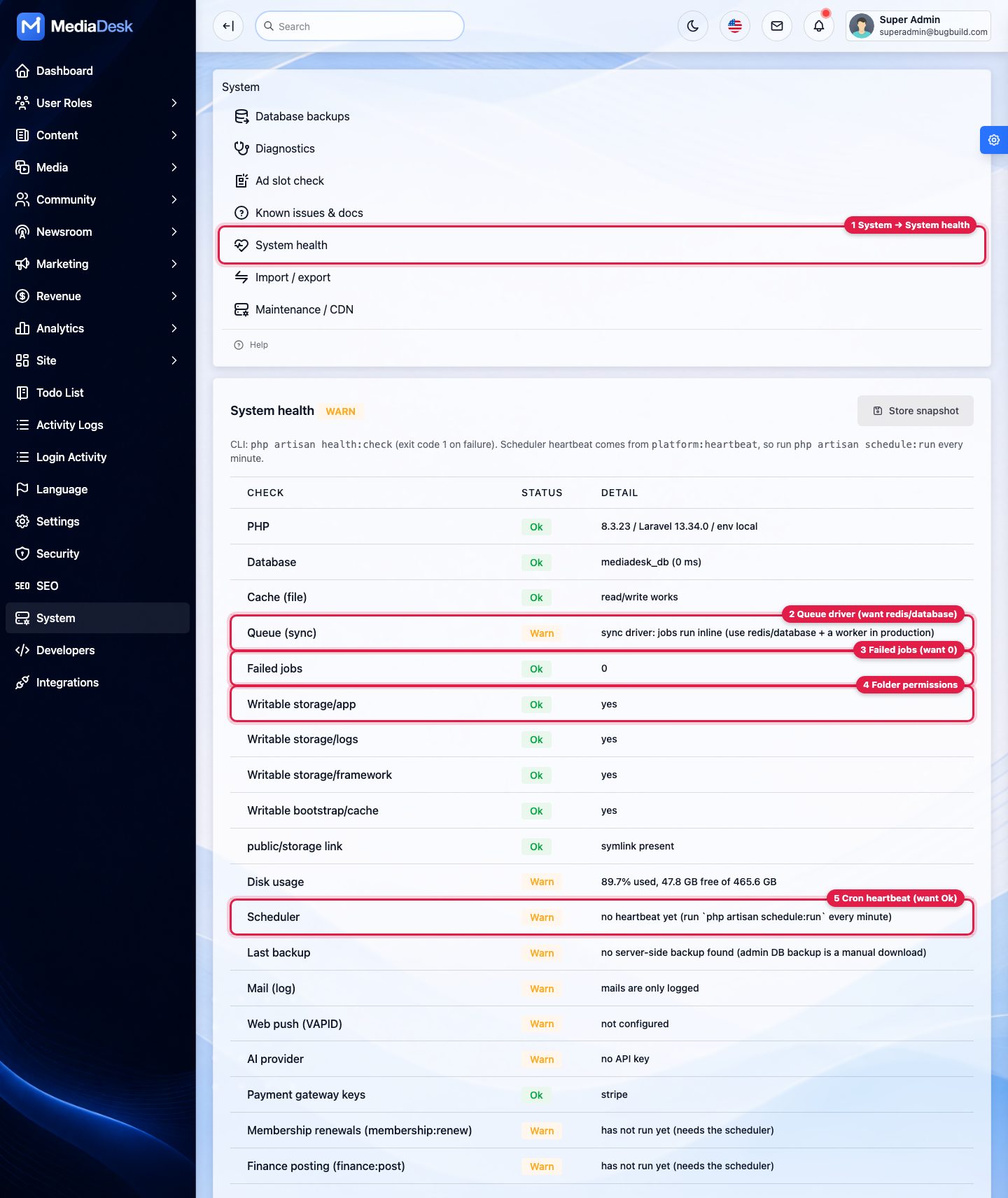
Open System → System health
Callout 1 in the screenshot.
Queue row (2)
Shows the driver in brackets. Queue (redis) or Queue (database) = Ok means a real queue is configured. Queue (sync) = Warn means jobs run inside the request (acceptable only for small sites).
Failed jobs row (3)
Should be
0. A growing number means jobs run but fail — see FAQ: queue worker.Writable rows (4)
All Ok; otherwise see FAQ: permission errors.
Scheduler row (5)
Ok with a recent time means cron runs every minute. “No heartbeat yet” means cron is not running: see FAQ: cron.
Web Server, Cache & Redis
The document root is public/. The essentials of an nginx server block:
server {
    listen 443 ssl;
    server_name news.example.com;
    root /var/www/mediadesk/public;
    index index.php;
    client_max_body_size 64m;

    location /build/   { add_header Cache-Control "public, max-age=31536000, immutable"; try_files $uri =404; }
    location /storage/ { add_header Cache-Control "public, max-age=2592000"; try_files $uri =404; }
    location / { try_files $uri $uri/ /index.php?$query_string; }
    location ~ \.php$ {
        fastcgi_pass unix:/run/php/php8.3-fpm.sock;
        fastcgi_param SCRIPT_FILENAME $realpath_root$fastcgi_script_name;
        include fastcgi_params;
    }
    location ~ /\.(?!well-known) { deny all; }
}- Do not add your own
Cache-Controlfor HTML: the app sendspublic, max-age=60, s-maxage=300, stale-while-revalidate=600for stateless pages andno-storefor forms./sw.jsmust stayno-cacheand be served from/. - Redis:
CACHE_STORE=redis,SESSION_DRIVER=redis,QUEUE_CONNECTION=redis, plusREDIS_HOST,REDIS_PORT,REDIS_PASSWORD. Needs the phpredis extension. - Production caches:
php artisan optimize(caches config, events, routes and views). Runphp artisan optimize:clearbefore editing.envor code on the server, thenoptimizeagain. - OPcache:
opcache.enable=1,memory_consumption=256,max_accelerated_files=20000; reload php-fpm on deploy ifvalidate_timestamps=0. - Behind a proxy or CDN make sure
TrustProxiesis correct sohttpsand client IPs are right (IP hashes drive throttling and spam controls).
AI Keys
Used by the AI copilot in the article editor and by AI intake. Open Integrations → AI default provider and choose one:
| Provider | Where | Default model |
|---|---|---|
| Anthropic (Claude) | Integrations → Anthropic (AI): API key from console.anthropic.com. .env: ANTHROPIC_API_KEY, AI_MODEL | claude-sonnet-5-5 |
| Google Gemini | Integrations → Google Gemini (AI): API key, model, URL | gemini-2.5-flash |
| OpenAI / ChatGPT | Integrations → OpenAI / ChatGPT (AI): API key, model, URL | gpt-4o-mini |
Step by step (admin panel)
Get a key
Create an API key in your provider’s console (console.anthropic.com, aistudio.google.com or platform.openai.com) and add billing there.
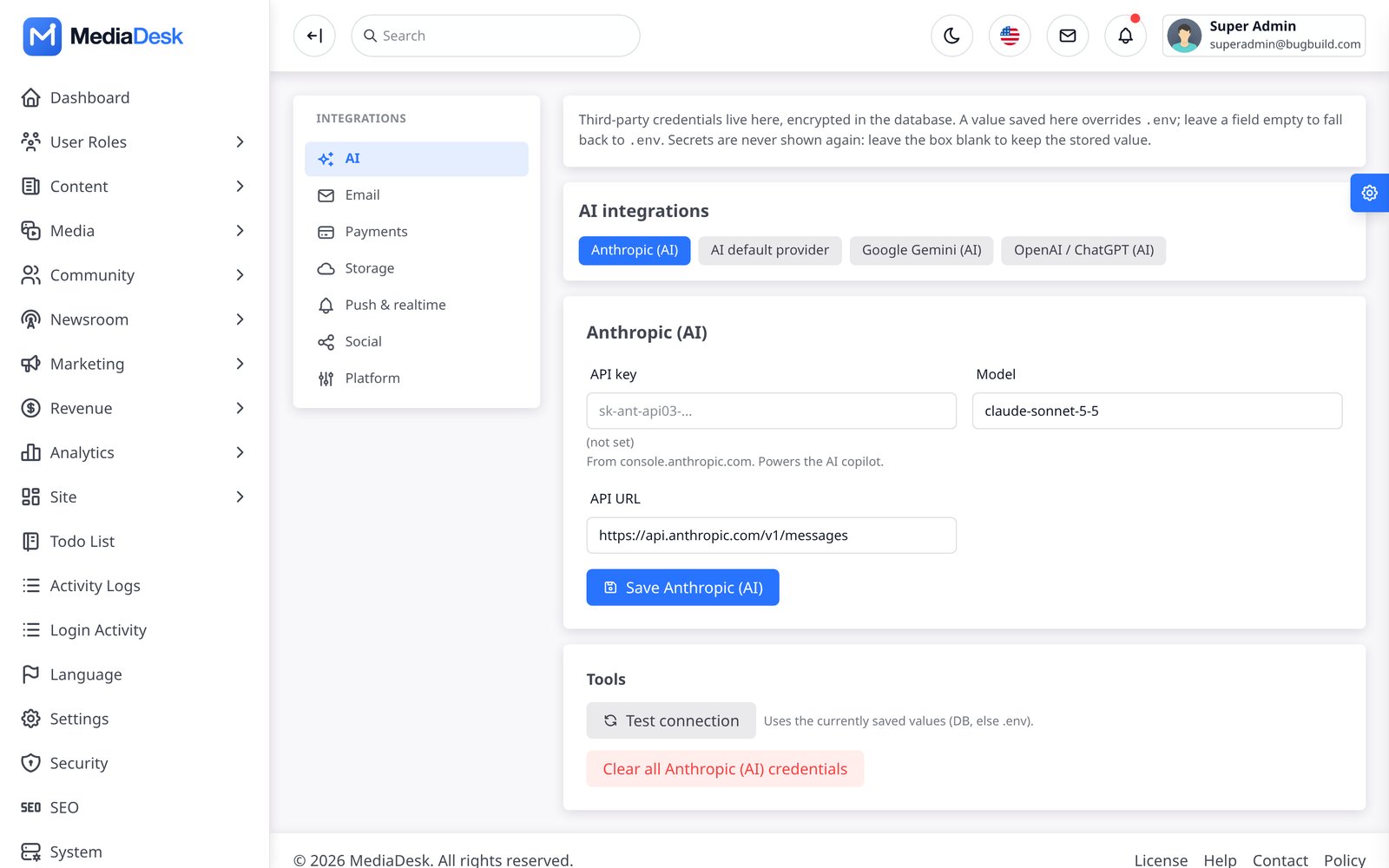
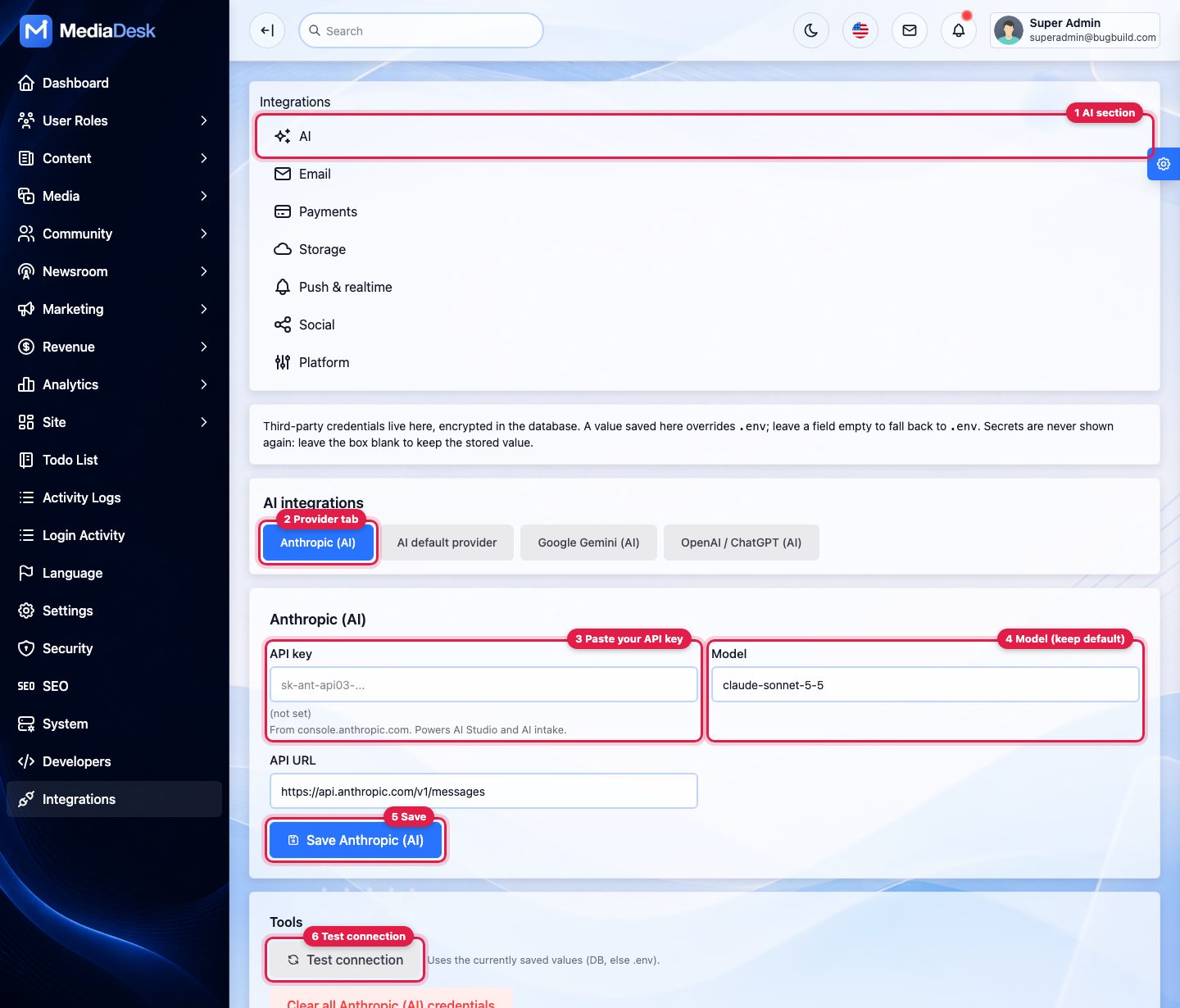
Open Settings → Integrations → AI
Callout 1, then the provider tab (2).
Paste the key
Into API key (3). Leave Model (4) and API URL on their defaults unless your provider tells you otherwise. Press Save (5).
Test
Test connection (6) sends one tiny request and shows OK or the provider’s error (wrong key, no credit, model not available).
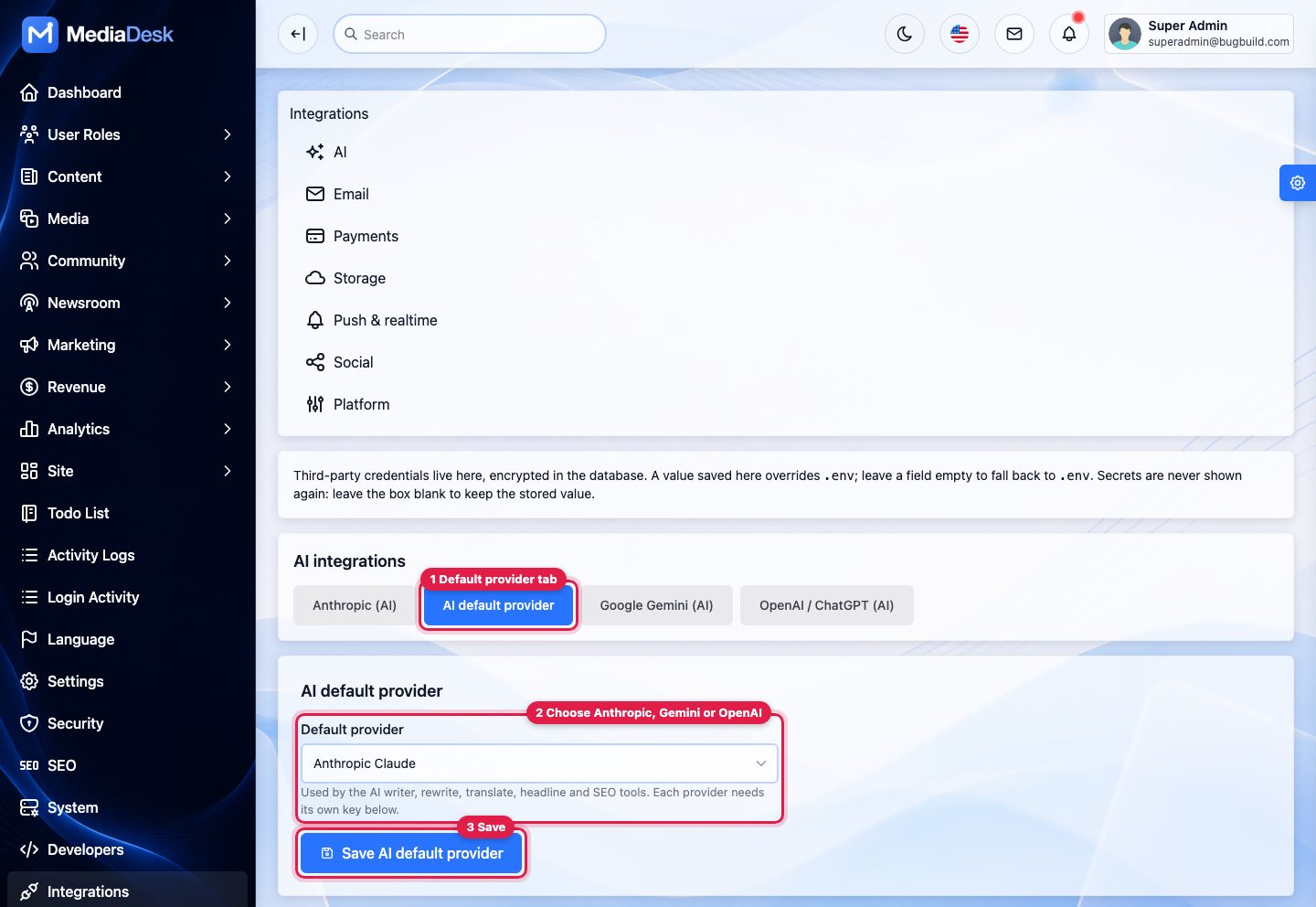
Choose the default provider
Tab AI default provider: pick the provider whose key you added and save. The AI tools use this provider.
Optional limits in .env: AI_PROVIDER (anthropic by default), AI_MAX_TOKENS (4000), AI_MONTHLY_TOKEN_LIMIT (newsroom soft budget, 0 = unlimited) and AI_USER_DAILY_CALLS (200). Click Test connection after saving. With no key the copilot says “not configured” and nothing is sent. You pay your provider directly; the AI paths were tested with faked HTTP.
Payment Gateways
Enter credentials in Integrations → Payments. A gateway is offered at checkout (memberships, ad invoices, donations, single articles) only when its keys exist. All gateways share one webhook route:
Third-party payment disclosure: Stripe, PayPal, SSLCOMMERZ and every other gateway listed below are external services. Buyers must open and maintain their own merchant accounts, supply their own credentials and webhooks, and pay all transaction, currency-conversion and provider fees.
POST https://YOUR-DOMAIN/membership/webhook/{gateway}
  stripe | paypal | sslcommerz | bkash | nagad | razorpay | mercadopago | iyzico | paytabs | paystack | nowpayments
It needs no CSRF token and no locale, is throttled to 120/minute, checks the provider signature (400 if invalid) and is idempotent. Browser returns land on /{locale}/membership/return/{invoice} (memberships) or /{locale}/payments/return/{number} (ad invoices, donations); the server re-confirms with the provider, the URL alone never marks anything paid. Every gateway has a sandbox toggle, on by default — test first.
| Gateway | Credentials | Notes |
|---|---|---|
| Stripe | Secret key (sk_test_…), webhook signing secret (whsec_…) | Webhook events: checkout.session.completed, checkout.session.async_payment_succeeded, checkout.session.async_payment_failed, checkout.session.expired, payment_intent.succeeded, payment_intent.payment_failed, invoice.payment_succeeded, invoice.payment_failed. Only gateway with automatic off-session renewal. Local test: stripe listen --forward-to localhost:8000/membership/webhook/stripe. Test card 4242 4242 4242 4242. |
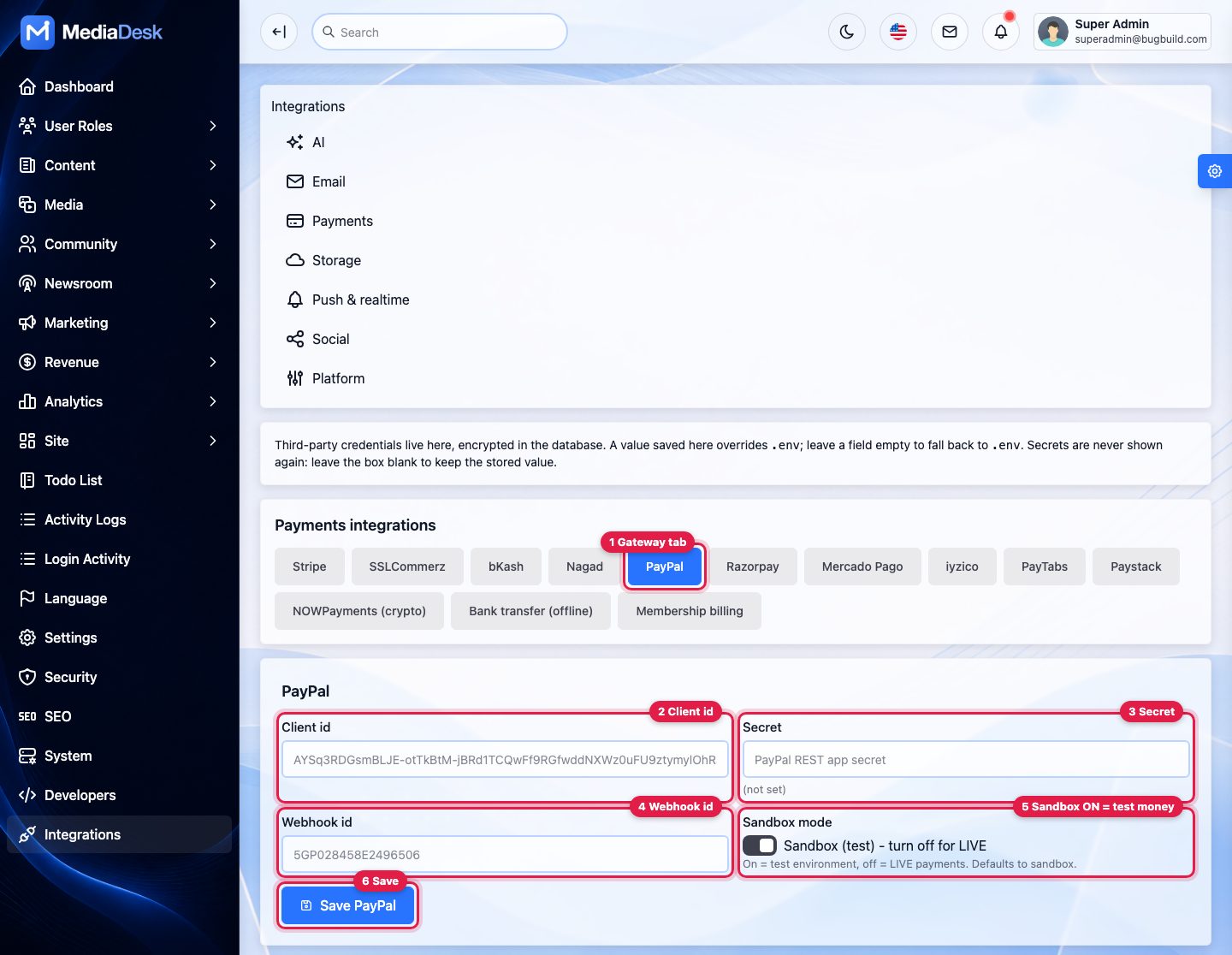
| PayPal | Client id, secret, webhook id | Create a REST app (sandbox). Webhook events PAYMENT.CAPTURE.COMPLETED and PAYMENT.CAPTURE.DENIED. PayPal cannot settle BDT: price plans in USD or another PayPal currency. |
| SSLCOMMERZ | Store id, store password, sandbox | Set the IPN URL to /membership/webhook/sslcommerz. Success only after verify_sign and the Validation API return VALID. |
| bKash | App key, app secret, username, password, sandbox | Tokenized checkout; no signed webhook, confirmed by the server-side execute call on return. BDT only. |
| Nagad | Merchant id, merchant private key, Nagad PG public key, sandbox | BDT only. No public refund API: credit notes are marked manual. |
| Razorpay | Key id, key secret, webhook secret | Webhook event payment_link.paid. |
| Mercado Pago | Access token, webhook secret | Checkout Pro; webhook topic Payments. |
| iyzico | API key, secret key | No webhook: confirmed on browser return. |
| PayTabs | Profile id, server key, region | Webhook with Signature header. |
| Paystack | Secret key | Webhook event charge.success. |
| NOWPayments (crypto) | API key, IPN secret | IPN webhook; only status finished pays; refunds are manual. |
| Bank transfer (proof) | Bank name, account name/number, SWIFT, instructions | Readers upload a receipt; staff approve in Membership → Bank transfers. |
| Manual / offline | — | Pending invoice, staff mark it paid. Instructions text via MEMBERSHIP_MANUAL_INSTRUCTIONS. |
Step by step (admin panel + the gateway’s dashboard)
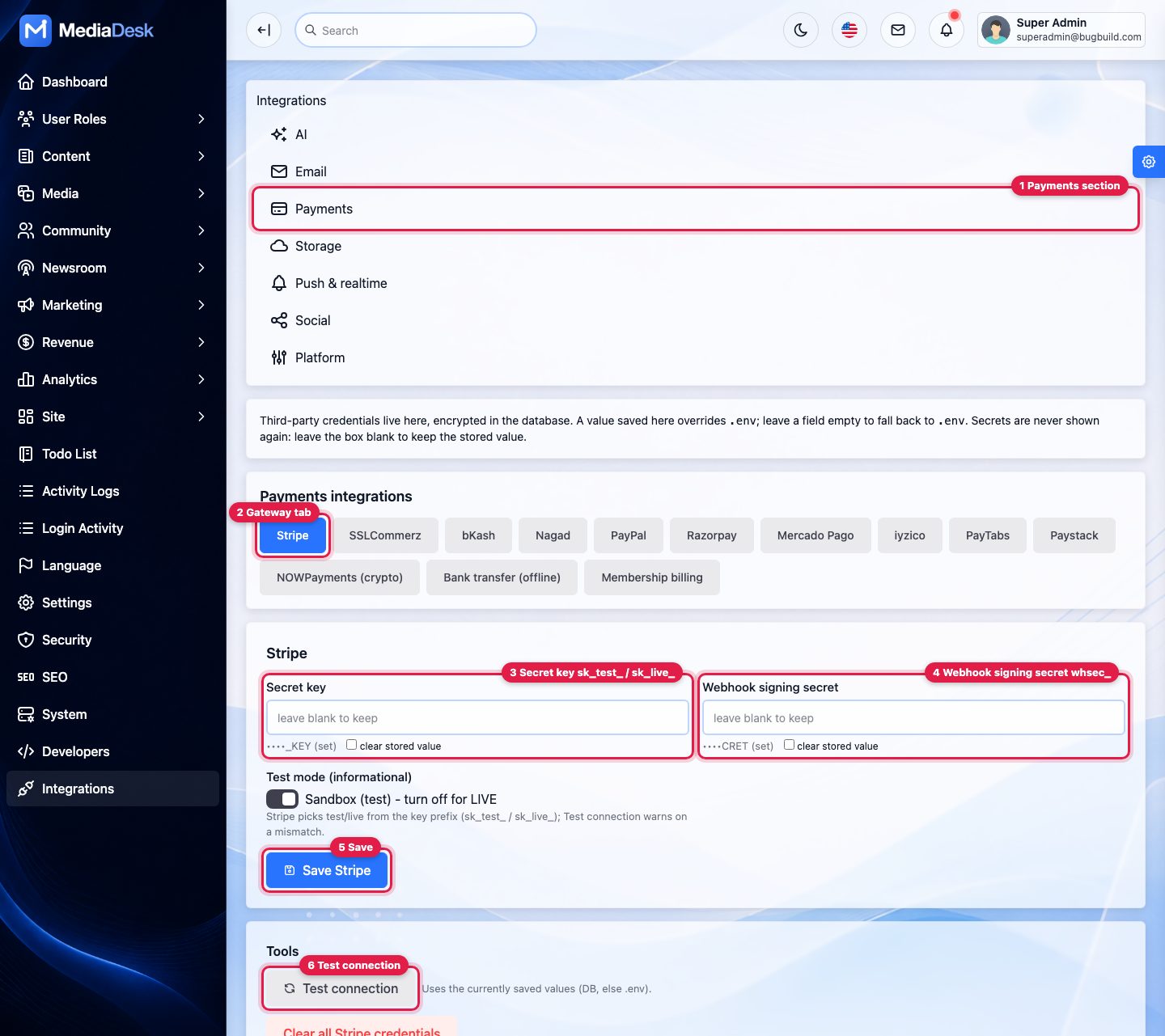
Open Settings → Integrations → Payments
Callout 1, then the gateway tab (2).
Paste the API credentials
Stripe: Secret key (3). Use
sk_test_…first; switch tosk_live_…when you go live.Create the webhook in the gateway’s dashboard
Use the URL for your gateway from the table below and select the events listed in the gateway table. The gateway then shows a signing secret (Stripe
whsec_…, PayPal Webhook id, Razorpay/PayTabs/NOWPayments secret).Paste the webhook secret
Into Webhook signing secret (4) and press Save (5).
Test
Test connection (6) checks the API key. Then buy a cheap plan with a test card and confirm in the gateway dashboard that the webhook delivery shows
200. A400means the secret does not match: see FAQ: webhook signature rejected.
Webhook URL per gateway
Replace your-domain.com with your domain. Paste the URL exactly: https, no language prefix, no trailing slash.
| Gateway | Webhook / IPN URL to enter in the gateway dashboard |
|---|---|
| Stripe | https://your-domain.com/membership/webhook/stripe |
| PayPal | https://your-domain.com/membership/webhook/paypal |
| SSLCOMMERZ (IPN) | https://your-domain.com/membership/webhook/sslcommerz |
| Razorpay | https://your-domain.com/membership/webhook/razorpay |
| Mercado Pago | https://your-domain.com/membership/webhook/mercadopago |
| PayTabs | https://your-domain.com/membership/webhook/paytabs |
| Paystack | https://your-domain.com/membership/webhook/paystack |
| NOWPayments (IPN) | https://your-domain.com/membership/webhook/nowpayments |
| bKash, Nagad, iyzico | No webhook to register: payment is confirmed by the server when the buyer returns |
| Bank transfer, Manual | No webhook: staff approve the payment |
Currencies INR, BRL, TRY, NGN and AED are available for plans priced for the later gateways. Renewals and dunning: membership:renew hourly, reminders after 1, 3 and 5 days (MEMBERSHIP_DUNNING_DAYS), expiry after MEMBERSHIP_GRACE_DAYS (default 7). Reminders before the period ends: membership:remind hourly, 7, 3 and 1 days before by default (Settings → Public site → Membership, or MEMBERSHIP_REMINDER_DAYS). Only Stripe can charge a saved card automatically; every other gateway sends the reader a link to pay. Refunds create credit notes and a negative ledger entry.
Adapters were written from each provider’s public documentation and tested with faked HTTP only. Sandbox every gateway with your own merchant account before going live; the bank-transfer and manual options need no provider.
Push: VAPID & FCM
Web push (VAPID) — website and PWA
Generate keys
php artisan frontend:push-keysprints a fresh pair as.envlines and writes nothing. (Alternativelynpx web-push generate-vapid-keys.)Save them
Paste into Integrations → Web push (VAPID) (public key, private key, subject such as
mailto:[email protected]) or into.envasPUSH_VAPID_PUBLIC_KEY,PUSH_VAPID_PRIVATE_KEY,PUSH_VAPID_SUBJECT, thenphp artisan config:clear.Check
Without the public key the opt-in card never shows. The card appears after the 2nd article view or via the footer “Notifications” button. Web push needs HTTPS.
Test
Tools → Diagnostics shows key status and sends one test push; CLI:
php artisan frontend:push-test --endpoint=<url>. 404/410 answers delete the subscription.
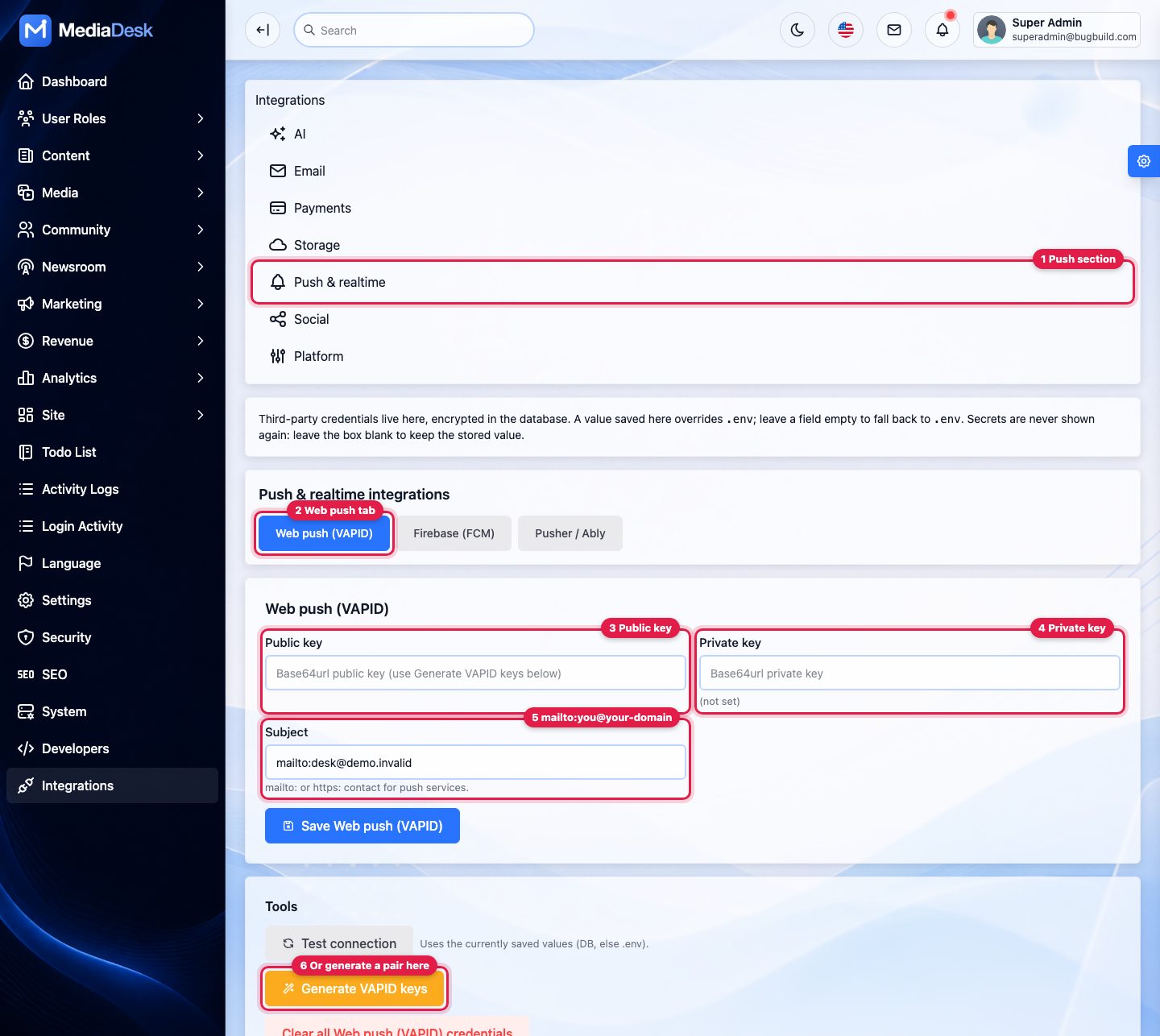
Your own keys, your own traffic. MediaDesk ships no VAPID key and no push endpoint of its own. The pair is generated on your server, the private key stays in your database, and each notification goes directly from your server to the endpoint the reader’s browser issued (Google, Mozilla or Apple push service). Nothing passes through the author’s servers. Generating a new pair makes existing subscribers subscribe again.
Firebase Cloud Messaging (FCM HTTP v1) — Android & iOS app
Third-party service disclosure: FCM is a Google Firebase service. You need your own Firebase project and account, and Google may charge for usage under its own pricing; these costs are not included in the item price.
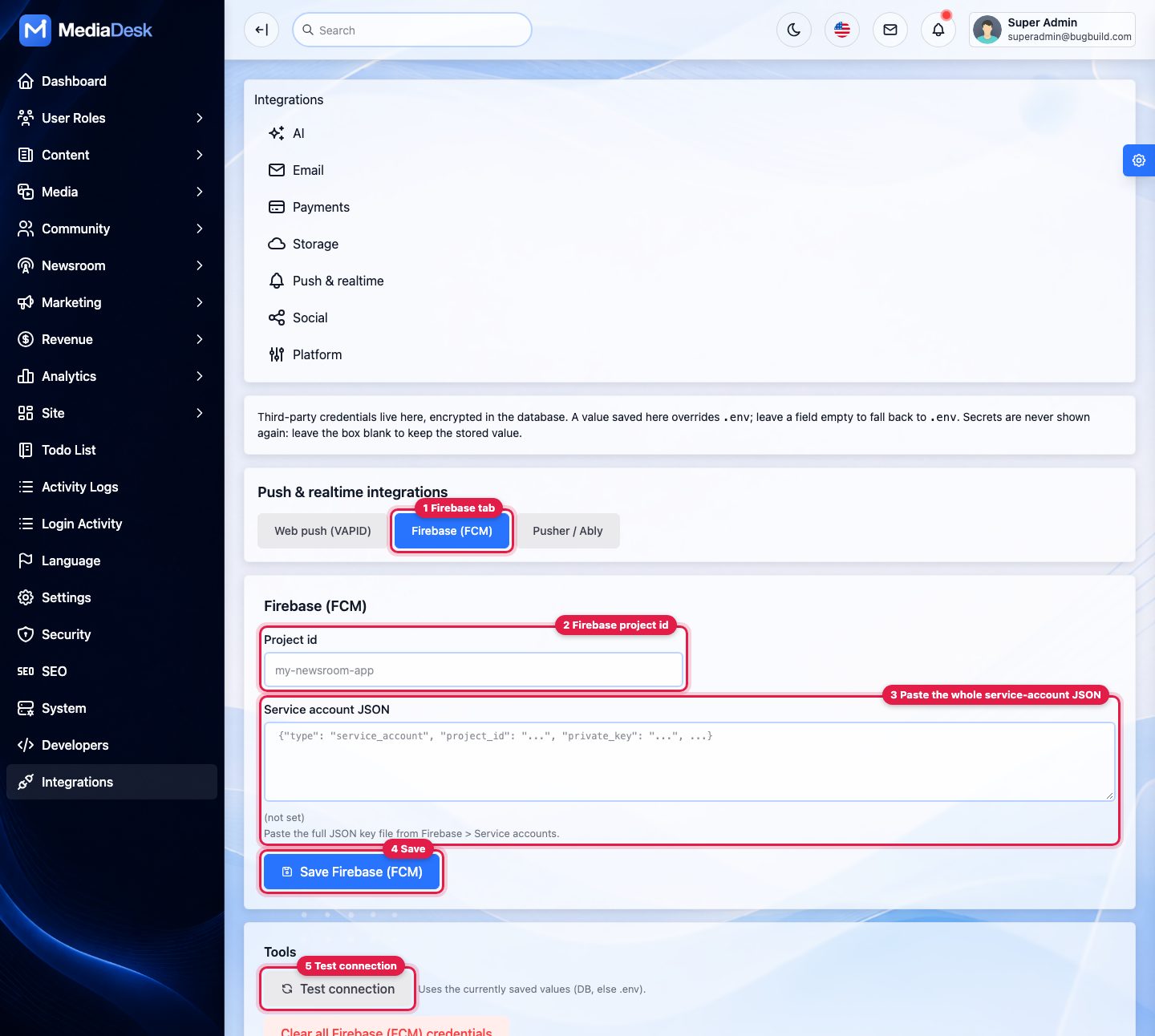
Create a Firebase project
console.firebase.google.com; add your Android and iOS apps (see Mobile App → Firebase).
Service account
Project settings → Service accounts → Generate new private key (JSON).
Save in MediaDesk
Integrations → Firebase (FCM): project id and the full service-account JSON (or
FCM_PROJECT_IDandFCM_SERVICE_ACCOUNT_JSONin.env). Optional:FCM_RETRIES(3),FCM_RETRY_MS(500),FCM_CHUNK(200 devices per job).Test one device
php artisan fcm:test <device-token> --title="Hello" --body="Test" --url=/en/news/some-slug. When not configured it reports “not configured”.
Push campaigns (Marketing → Push alerts) and breaking alerts send web push, then fan out FCM to registered devices that match language and topic (breaking, all, category). A campaign can send with FCM only. Article links are converted to mediadesk://article/{slug} for the app. A queue worker is required. The app registers its token through POST /api/v1/devices.
Push was verified against faked HTTP only. Send a real test to a real device from your own Firebase project before announcing the feature.
Headless Chrome
Two features use a headless Chrome/Chromium binary on the server:
- E-paper PDFs (
php artisan frontend:epaper-build, scheduled daily 05:30, site time zone). Chrome opens/{locale}/e-paper/{date}/printand prints to PDF. Auto-detected binaries: macOS Chrome/Chromium,google-chrome,chromium. Override withEPAPER_CHROME=/usr/bin/google-chrome.EPAPER_BASE_URL(defaultAPP_URL) must be reachable from the server itself. Languages need at least 30 published translations (EPAPER_MIN_STORIES). Downloads:EPAPER_DOWNLOAD=free|premium. - Social cards — text is rendered by Chrome for correct Bangla conjuncts and Arabic joining; Integrations → Social cards
autouses Chrome when present, else GD.
# Debian / Ubuntu example
sudo apt install -y chromium fonts-noto fonts-noto-core
# or Google Chrome from Google's apt repo, then:
php artisan frontend:epaper-build --locale=en --force
# one date / one language
php artisan frontend:epaper-build YYYY-MM-DD --locale=bn --edition=dhaka
Install Bangla and Arabic capable fonts (for example Noto) on the server or the PDF will show blanks. If the build fails the edition row shows status failed; the command prints a clear error when no Chrome binary is found.
CDN
Put Cloudflare, Bunny or CloudFront in front of the origin. HTML is cacheable (s-maxage=300, no cookies on stateless pages).
- Cache by full URL; do not strip
ETag; vary only onAccept-Encoding. - Bypass cache for the paths below (details after this list). Requests other than GET/HEAD are never cached by CDNs by default; leave it that way.
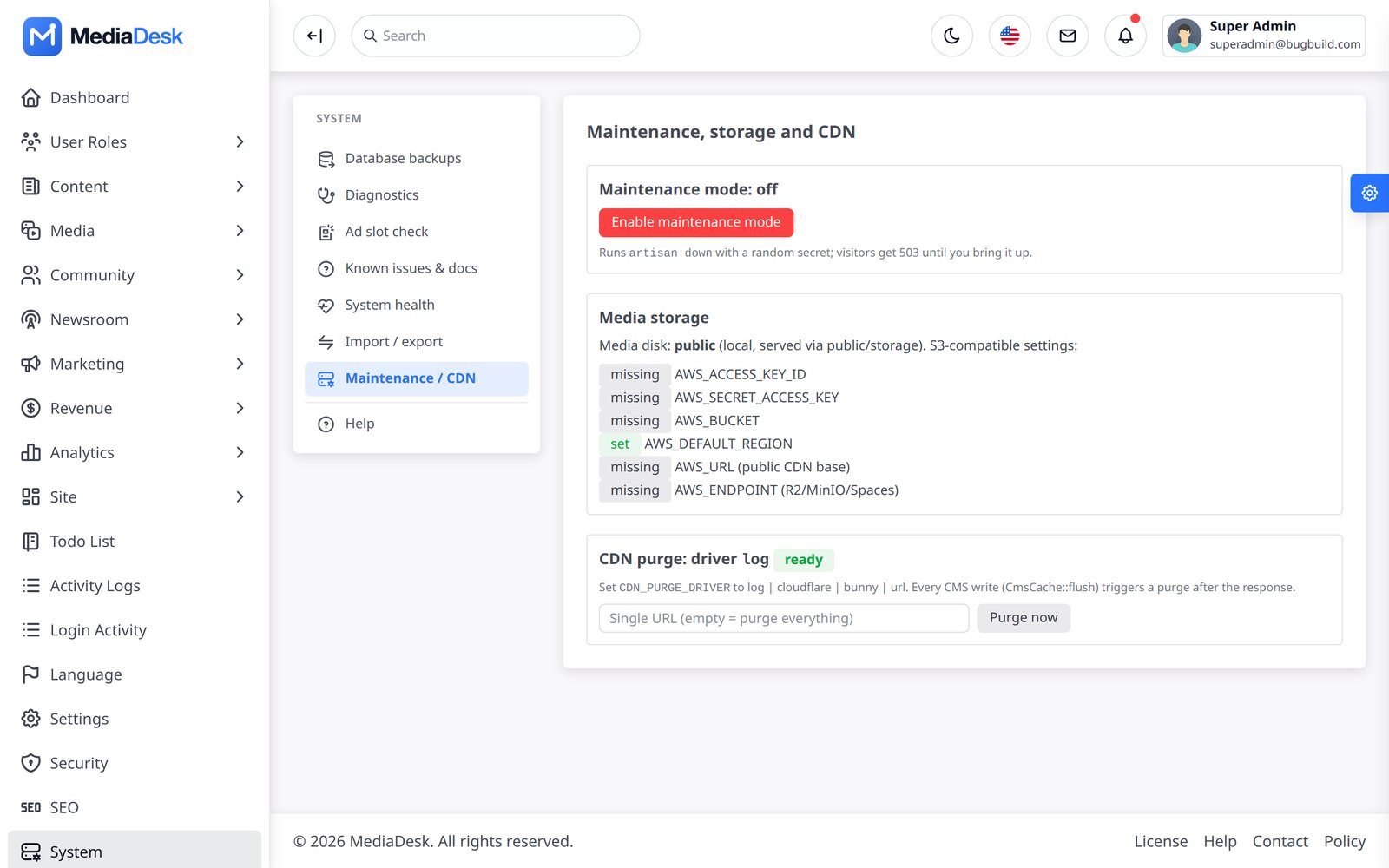
- Purge: Integrations → CDN purge — driver
log(default, only logs),cloudflare(zone id + API token),bunny(pull zone id + API key) or genericurl(endpoint + secret). System → Maintenance / CDN has a purge button and shows the driver status. - Media on S3/R2/B2 can use the CDN base URL as
AWS_URL.
Paths to bypass (copy into your CDN dashboard)
Create one rule “URI path starts with … → Bypass cache” (Cloudflare: Caching → Cache Rules; Bunny: Edge Rules → Override cache time 0; CloudFront: a behaviour with the CachingDisabled policy) and add each line below as its own value. Every line is a plain path: no wildcards, no regular expressions.
/admin
/dashboard
/login
/logout
/forgot-password
/reset-password
/password
/install
/demo-login
/account/google
/membership/webhook
/broadcasting
/sanctum
/api/v1/auth
/api/v1/me
/api/v1/devices
/sw.js
Then the same eight paths for each language your site uses. The four built-in languages are shown; add eight more lines for every language you add (with its code, for example /de/).
/en/account
/en/advertiser
/en/membership
/en/payments
/en/newsletter
/en/csrf
/en/preview
/en/search/suggest

/bn/account
/bn/advertiser
/bn/membership
/bn/payments
/bn/newsletter
/bn/csrf
/bn/preview
/bn/search/suggest

/ar/account
/ar/advertiser
/ar/membership
/ar/payments
/ar/newsletter
/ar/csrf
/ar/preview
/ar/search/suggest

/fr/account
/fr/advertiser
/fr/membership
/fr/payments
/fr/newsletter
/fr/csrf
/fr/preview
/fr/search/suggest
“Starts with” matters: /en/newsletter also covers the signed confirmation, unsubscribe and preferences links under it, and /admin covers every admin screen. If your CDN only offers “equals”, use its “starts with” or “wildcard” option instead; an exact-match rule would miss the pages below each path. On Cloudflare also add a WAF skip rule for /membership/webhook so payment webhooks are never challenged.
Captcha, Google, Pusher
- Captcha — Integrations → Captcha: none, reCAPTCHA v2/v3 or Cloudflare Turnstile with site key and secret (and minimum score for v3). Applies to register, login, contact, comments and newsletter forms.
- Google Indexing API — paste a service-account JSON (owner in Search Console), then enable it in SEO.
- Brevo, Mailgun, Postmark, SES — see Mail.
- Pusher / Ably — optional realtime broadcasting credentials (
PUSHER_APP_ID,PUSHER_APP_KEY,PUSHER_APP_SECRET,PUSHER_APP_CLUSTER). - GA4 / Meta Pixel / AdSense — ids in Settings → Public site; loaded only after cookie consent.
.env Reference
Keys that matter in a typical install (see .env.example). Most credentials can instead be entered in Integrations. The demo switch is APP_DEMO everywhere in the code, .env.example and this documentation.
| Key | Default / example | Purpose |
|---|---|---|
APP_ENV, APP_DEBUG, APP_URL | production, false, https origin | APP_URL must match the real scheme+host: used in links, signed URLs, sitemaps |
SITE_TIMEZONE, APP_CURRENCY | UTC, USD | Default public time zone and base currency (both can be changed later in the admin). The database always stores UTC |
DB_CONNECTION, DB_HOST, DB_PORT, DB_DATABASE, DB_USERNAME, DB_PASSWORD | mysql, … | Written by the installer |
CACHE_STORE, SESSION_DRIVER, QUEUE_CONNECTION | file, file, sync | Use redis in production |
SESSION_SECURE_COOKIE | true behind HTTPS | Secure cookies |
MEDIA_DISK, AWS_* | public | Media storage |
MAIL_*, FRONTEND_CONTACT_TO | log | Mail (or Integrations) |
SENDER_MAIL_RATE, SENDER_QUEUE | 10, unset | Newsletter throttle and queue |
PUSH_VAPID_PUBLIC_KEY, PUSH_VAPID_PRIVATE_KEY, PUSH_VAPID_SUBJECT | unset | Web push |
FCM_PROJECT_ID, FCM_SERVICE_ACCOUNT_JSON | unset | App push |
ANTHROPIC_API_KEY, AI_PROVIDER, AI_MODEL, AI_MONTHLY_TOKEN_LIMIT, AI_USER_DAILY_CALLS | anthropic, claude-sonnet-5-5, 0, 200 | AI copilot |
STRIPE_SECRET, STRIPE_WEBHOOK_SECRET, SSLCOMMERZ_*, BKASH_*, NAGAD_*, PAYPAL_* | unset, sandbox true | Original five gateways (the rest are Integrations-only) |
MEMBERSHIP_GRACE_DAYS, MEMBERSHIP_DUNNING_DAYS, MEMBERSHIP_MANUAL_INSTRUCTIONS | 7, 1,3,5 | Renewals |
MEMBERSHIP_REMINDER_DAYS, MEMBERSHIP_REMINDER_ENDING_DAYS | 7,3,1 and 3 | Reminders before renewal, and the single notice for a membership that will not renew. The Admin setting overrides the first one. |
EPAPER_CHROME, EPAPER_BASE_URL, EPAPER_DOWNLOAD, EPAPER_MIN_STORIES | auto, APP_URL, free, 30 | E-paper |
SEO_INDEXABLE, SEO_AI_CRAWLERS, SEO_SITEMAP_MODE | false, allow, flat | Indexing |
FRONTEND_COMMENTS_AUTO_APPROVE | false | Hold comments for moderation |
CONTENT_FETCH_ENABLED | false | Live Bangladesh weather/rates/DSE fetch |
APP_DEMO | false | Public demo switch: demo login buttons, read-only demo role and demo logins, nightly demo:reset (non-production only). Never true on a real site |
DEMO_READONLY_ACCOUNTS | true | Only with APP_DEMO=true: makes the published demo logins read-only |
PUSHER_*, CDN_PURGE_DRIVER, CLOUDFLARE_*, BUNNY_* | unset | Optional |
Check It Works
php artisan mediadesk:doctor          # PHP, folders, DB, cache/queue/mail, optional tools, with fix hints
php artisan health:check              # system health checks (exit code 1 on failure)
php artisan schedule:list             # confirm scheduled commands
php artisan queue:failed              # failed jobs
php artisan frontend:marketing-stats  # subscribers per list / push subscriptions
tail -n 50 storage/logs/laravel.log
Symptom-by-symptom help: Troubleshooting FAQ. In the browser: System → System health and System → Diagnostics (test e-mail, AI key, storage write, push key status and a test push).
Social OAuth & Telegram
For Automation → Social accounts & UTM. Create a developer app at each network, then put the client id/secret in Integrations → Social. Register this redirect URI exactly (replace the domain and provider):
SOCIAL_FACEBOOK_CLIENT_ID/_SECRET), or a Page access tokenpages_show_list,pages_manage_posts,pages_read_engagementSOCIAL_LINKEDIN_*), or an access tokenw_member_social,w_organization_socialSOCIAL_X_*), OAuth 2.0 with PKCE, or a user bearer tokentweet.read,tweet.write,users.read,media.write,offline.accessSOCIAL_TELEGRAM_BOT_TOKEN); add the bot to your channel, use the channel handle in the accountThen open Automation → Connect accounts (
/admin/social/oauth) and press Connect. Keep an account on thelogdriver (dry run) until you are happy with the output. Reader sign-in with Google: create an OAuth client and registerhttps://YOUR-DOMAIN/account/google/callback, then enter id and secret in Integrations → Google sign-in.Social publishing was tested with faked HTTP only. Each network reviews apps and may restrict posting permissions; follow their app-review process.